

Annoto Integration
Overview
This document shows how to add Annoto to your Blackboard environment.
Creating a Tool Provider
This section describes how to create a Tool Provider so that you can deploy the Annoto Extension for Blackboard. The Tool Provider allows you to enter the Annoto key and secret one time for all the Annoto tools.
To Create the Tool Provider:
[ ] Login to Blackboard as an admin.
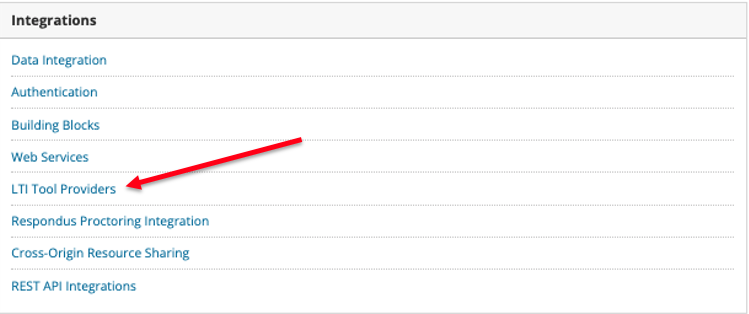
[ ] Go to “Administrator Tools” and select LTI Tool Providers.
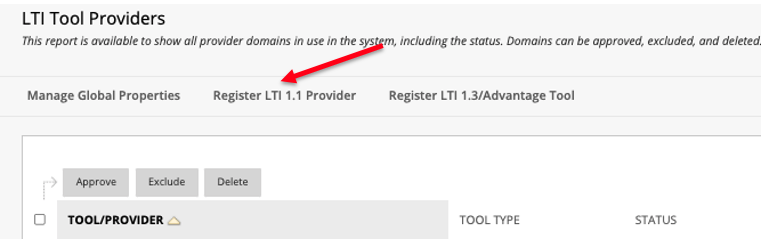
[ ] Navigate to the “Register LTI 1.1 Provider (In old versions its called “Register Provider Domain”) tab
[ ] Set the PROVIDER DOMAIN STATUS:
“Provider Domain”:
EU Deployment: auth.eu.annoto.net
US Deployment: auth.us.annoto.net
Provider Domain Status: Approved
[ ] Set the DEFAULT CONFIGURATION:
Set the “Default Configuration” to “Set globally”
Tool Provider Key: Use your Annoto API Key (ClientID)
Tool Provider Secret: Use your Annoto Secret
This key and shared secret is provided by Annoto, If you do not have this information, please contact us: support@annoto.net
[ ] Set the INSTITUTION POLICIES:
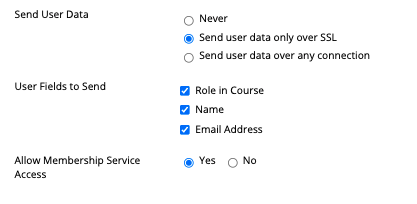
[ ] Click Submit
Deploying the Annoto Tools to Your Blackboard Environment
This section describes how to add the following tools to your Blackboard environment:
Annoto Widget Embed
Annoto insights dashboard
[ ] Login to Blackboard Ultra as an admin.
[ ] Go to “Administrator Tools” and click on LTI Tool Providers.
[ ] Navigate to the “Register Provider Domain” tab and locate the Tool/Provider you created.
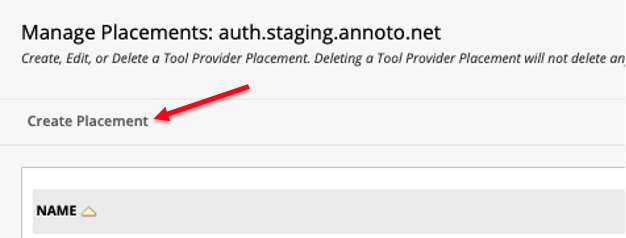
[ ] Click Manage Placements.
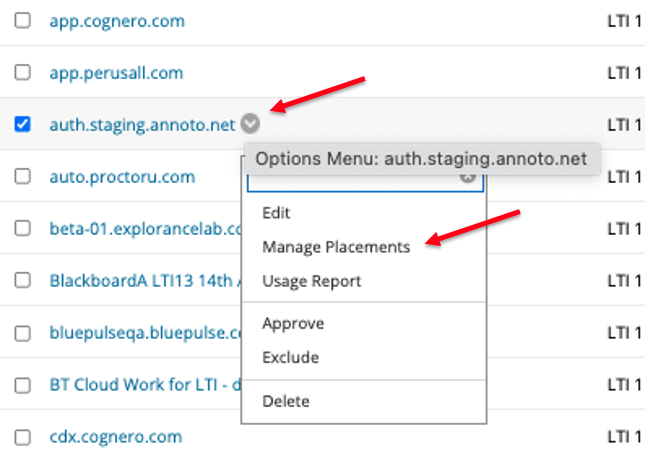
Click Create Placement.
[ ] Label: Annoto Widget Embed
[ ] Handle: Annoto-lti01
[ ] Availability: Yes
[ ] Type: “Deep Linking content tool”
[ ] Icon: The Annoto Icon can be downloaded from: https://cdn.annoto.net/assets/latest/images/icon.svg
[ ] Tool Provider URL: Fill in the following URL:
EU Deployment: https://auth.eu.annoto.net/lti/item-embed
US Deployment: https://auth.us.annoto.net/lti/item-embed
[ ] Click Submit.
Annoto insights dashboard
Create a placement with the following information:
[ ] Label: Annoto Dashboard
[ ] Handle: AnnotoDash
[ ] Availability: Yes
[ ] Type: “Course tool”
[ ] Icon: The Annoto Icon can be downloaded from: https://cdn.annoto.net/assets/latest/images/icon.svg
[ ] Tool Provider URL: Fill in the following URL:
EU Deployment: https://auth.eu.annoto.net/lti/course-insights
US Deployment: https://auth.us.annoto.net/lti/course-insights
[ ] Click Submit.