> For the complete documentation index, see [llms.txt](https://docs.annoto.net/guides/llms.txt). Markdown versions of documentation pages are available by appending `.md` to page URLs; this page is available as [Markdown](https://docs.annoto.net/guides/annoto-widget/features/interactions/interactions-types.md).
# Interactions Types
## True/False
True or false questions allow you to set a question that has two answers, and only one of them is correct (Can also be a Yes/No question).
## Multiple Choice
Multiple Choice Questions allows you to ask a question and provide as many answers as you like, with only one correct answer.
## Multiple Answer
Multiple Answer Questions allows you to ask a question and provide as many answers as you like, with more than one correct answer. There is no limitation on the number of correct answers you can set.
## Fill In the Blank
Annoto currently supports *fill-in-the-blank style* questions through the **Multiple Select** and **Multiple Answer** question types.
These formats allow instructors to present a sentence with a single blank space and offer a predefined set of options for learners to choose from—enabling both simple and more nuanced fill-in-the-blank interactions.
This approach is flexible and effective for a wide range of learning objectives, including vocabulary reinforcement, concept checks, and knowledge recall. Learners can engage actively by selecting the correct word or phrase that completes the sentence, encouraging critical thinking in context.
#### Examples:
* **Fill in the Blank using *****Multiple Select***** type:**
*The capital of France is \_\_\_.*
* [ ] Berlin
* [x] Paris
* [ ] Madrid
* [ ] Rome
*(Only one correct option is selected from the list.)*
* **Fill in the Blank using *****Multiple Answer***** type:**
*\_\_\_ are considered programming languages.*
* [x] Python
* [ ] Excel
* [x] JavaScript
* [ ] Google Docs
*(Multiple correct options can be selected by the learner.)*
This method keeps the quiz experience intuitive while allowing for customizable assessment logic depending on the instructional goal.
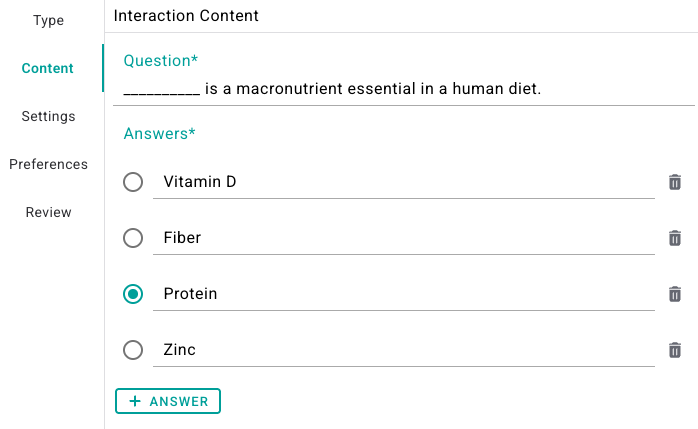
Fill in the blank using a **Multiple-Select** quiz type:
Fill in the blank using a **Multiple-Answer** quiz type:
 ## Multiple Choice
Multiple Choice Questions allows you to ask a question and provide as many answers as you like, with only one correct answer.
## Multiple Choice
Multiple Choice Questions allows you to ask a question and provide as many answers as you like, with only one correct answer.
 ## Multiple Answer
Multiple Answer Questions allows you to ask a question and provide as many answers as you like, with more than one correct answer. There is no limitation on the number of correct answers you can set.
## Multiple Answer
Multiple Answer Questions allows you to ask a question and provide as many answers as you like, with more than one correct answer. There is no limitation on the number of correct answers you can set.
 ## Fill In the Blank
Annoto currently supports *fill-in-the-blank style* questions through the **Multiple Select** and **Multiple Answer** question types.
These formats allow instructors to present a sentence with a single blank space and offer a predefined set of options for learners to choose from—enabling both simple and more nuanced fill-in-the-blank interactions.
This approach is flexible and effective for a wide range of learning objectives, including vocabulary reinforcement, concept checks, and knowledge recall. Learners can engage actively by selecting the correct word or phrase that completes the sentence, encouraging critical thinking in context.
#### Examples:
* **Fill in the Blank using *****Multiple Select***** type:**
*The capital of France is \_\_\_.*
* [ ] Berlin
* [x] Paris
* [ ] Madrid
* [ ] Rome
*(Only one correct option is selected from the list.)*
* **Fill in the Blank using *****Multiple Answer***** type:**
*\_\_\_ are considered programming languages.*
* [x] Python
* [ ] Excel
* [x] JavaScript
* [ ] Google Docs
*(Multiple correct options can be selected by the learner.)*
This method keeps the quiz experience intuitive while allowing for customizable assessment logic depending on the instructional goal.
Fill in the blank using a **Multiple-Select** quiz type:
## Fill In the Blank
Annoto currently supports *fill-in-the-blank style* questions through the **Multiple Select** and **Multiple Answer** question types.
These formats allow instructors to present a sentence with a single blank space and offer a predefined set of options for learners to choose from—enabling both simple and more nuanced fill-in-the-blank interactions.
This approach is flexible and effective for a wide range of learning objectives, including vocabulary reinforcement, concept checks, and knowledge recall. Learners can engage actively by selecting the correct word or phrase that completes the sentence, encouraging critical thinking in context.
#### Examples:
* **Fill in the Blank using *****Multiple Select***** type:**
*The capital of France is \_\_\_.*
* [ ] Berlin
* [x] Paris
* [ ] Madrid
* [ ] Rome
*(Only one correct option is selected from the list.)*
* **Fill in the Blank using *****Multiple Answer***** type:**
*\_\_\_ are considered programming languages.*
* [x] Python
* [ ] Excel
* [x] JavaScript
* [ ] Google Docs
*(Multiple correct options can be selected by the learner.)*
This method keeps the quiz experience intuitive while allowing for customizable assessment logic depending on the instructional goal.
Fill in the blank using a **Multiple-Select** quiz type:
